rzMVC Framework
Setup Lets get it running
1 Download rzMVC and extract/clone it somewhere sensible. You can get it here.
2 Set up your webserver. rzMVC has been tested with Apache 2.0+ and nginx 1.3.11+. Apache requires mod_rewrite to be enabled, while nginx makes use of HttpRewriteModule.
server {
	listen 80;
	root /path/to/rzmvc/www;

	error_page 404 /index.php;
	index index.php index.html index.htm;

	# unless the request is for a valid file, send to bootstrap
    if (!-e $request_filename)
    {
    	rewrite ^/(.*)$ /index.php?/$1 last;
    	break;
    }

 	location ~ \.php$ {
 		# change thie value accordingly
 		fastcgi_param 				ENVIRONMENT Development;
		include 					fastcgi_params;
		fastcgi_intercept_errors 	on;
		fastcgi_pass   				127.0.0.1:9000;
	}

	location ~ /\.ht {
		deny  all;
	}
}
apache/vhost conf:

<VirtualHost *:80>
	ServerAdmin your@email.com
	ServerName your.server.com

	DirectoryIndex index.php
	DocumentRoot /absolute/path/to/rzmvc/www/
</VirtualHost>
SetEnv ENVIRONMENT Development

<IfModule mod_rewrite.c>
	RewriteEngine on
	RewriteCond $1 !^(index\.php|public|robots\.txt)
	RewriteRule ^(.*)$ /index.php/$1 [L]
</IfModule>
The first line sets an environmental variable that the framework references to set the application environment. By default, errors & logging in lower environments are more verbose, whereas higher environments will silently fail and write errors to a logfile. This is all configurable, and covered later in the documentation. If an environment is not defined here, rzMVC will fall back to reading it from the environments configuration file.
The mod_rewrite clause instructs Apache to direct all incoming requests for anything but URLs beginning with /public/ and robots.txt to rzMVC. The framework takes it from there.
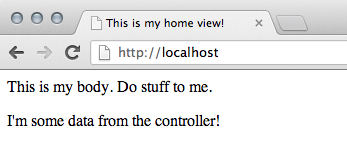
3 Restart your webserver and ensure the framework is running. A default installation should look something like the following:
Controllers The meat & potatoes
Basic Information
Controllers are the heart of any MVC application. They're where your core application logic resides — handling incoming requests, user input, querying models, and preparing & invoking views.
Controller classnames take the form of Name_Controller and extend the base Controller class. Incoming requests to your application are automatically mapped to corresponding controllers and methods within, though this behavior can be overridden with custom 'vanity' routes, covered in a later section. By default, the index method is invoked if the URI doesn't route to a specific method.
Example Controller
class Home_Controller extends Controller
{
	public function __construct()
	{
		parent::__construct();
	}

	public function index()
	{
		echo 'welcome home!';
	}

	public function test($val = 'default', $val2 = 123)
	{
		echo "$val : $val2";
	}

	private function hidden()
	{
		// Methods must be public to invoked by URI requests
	}
}
Controller Routing & Request Parameters
The rzMVC router attempts to map every incoming request to a corresponding controller & method, passing any additional URI segments to the method as parameters. Consult the following to get a sense of how URI -> Controller mapping works, assuming that Home_Controller is designated as your default controller* and no other controllers exist in your project.
| Incoming URI | Output |
|---|---|
| / | "welcome home" |
| /index | 404 not found |
| /home | "welcome home" |
| /home/index | "welcome home" |
| /home/asdf | 404 not found |
| /home/test | "default : 123" |
| /home/test/howdy | "howdy : 123" |
| /home/test/something/555 | "something : 555" |
| /home/test//555 | " : 555" |
| /home/hidden | 404 not found |
Views Presentation layer
Basic Information
Views are where the presentation markup and logic reside. They are usually a mixture of PHP and other front-end markups/languages (HTML, JS, etc) and are prepared and loaded by Controllers with no knowledge of the underlying system. When a Controller loads a View, it makes accessible any data the view might need to render correctly. Since views are generated from the context of a Controller, they technically have the ability to perform any actions available to their invoking Controller, but it is rarely a prudent design decision to do so; Views should be limited to act on local context and session data.
Example
class Users_Controller extends Controller
{
	private $umodel;

	public function __construct()
	{
		$this->umodel = new User_Model();
		parent::__construct();
	}

	// view all users
	public function index()
	{
		$this->load_view('users', array(
			'allusers' => $this->umodel->fetchAllUsers(),
			'is_admin' => $this->umodel->isAdmin($this->session->get('uid'))
		));
	}
}
As can be seen here, Views are loaded with the load_view(viewpath, optional_data) method. The first parameter is the path to the view file which resides under application/views/. Views can reside directly inside this directory or inside any level of subdirectories. If a view resides inside a subdirectory, simply include the directory name in the path, i.e. $this->load_view('path/to/nested/view').
The second parameter is an optional array, containing any data you wish to make accessible to the view. In a typical data-driven web application, this will usually involve information retrieved from a database (via Models, covered next), validation data (if working with user input), and other values necessary for the view to successfully render it's content. The data array is a typical multidimensional associative array consisting of key-value pairs, where the keyname becomes the name of the variable in the view. For example, array('mykey' => 'myvalue') would result in 'myvalue' accessible as $mykey in the loaded View.
<?php $this->load_view('common/header'); ?>

<table>
	<?php foreach($allusers as $user): ?>
	<tr>
		<td><?=$user->username?></td>
		<td><?=$user->email?></td>
		<?php if($is_admin): ?>
		<td><a href="/users/edit/<?=$user->id?>">Edit User</a></td>
		<?php endif; ?>
	</tr>
	<?php endforeach; ?>
</table>

<?php $this->load_view('common/footer'); ?>
While the view should only act on and display values explicitely made accessible to it, Views are capable of loading other views if you so choose. This is purely a design decision and is no more or less valid than only loading Views from Controllers. If you choose to load Views within Views, keep in mind that only data explicitely passed to it
Models Data access layer
Some text here, man.
Routing Which code runs
Some text here, man.
Configuration Working with your application's config
Some text here, man.
Databases So you want some data in your app?
Some text here, man.
Sessions Persistence. Sort of...
Some text here, man.
User Input Working with client data
Some text here, man.
Input Validation You can't trust anyone
Some text here, man.
Logging Nope, not the rainforest
Some text here, man.
Output Sending data back to the client
Some text here, man.
User Defined Classes Stuff you write
Some text here, man.
Extending rzMVC So you don't like how something works...
Some text here, man.